The 5 Stages of IT Asset Lifecycle Management Explained
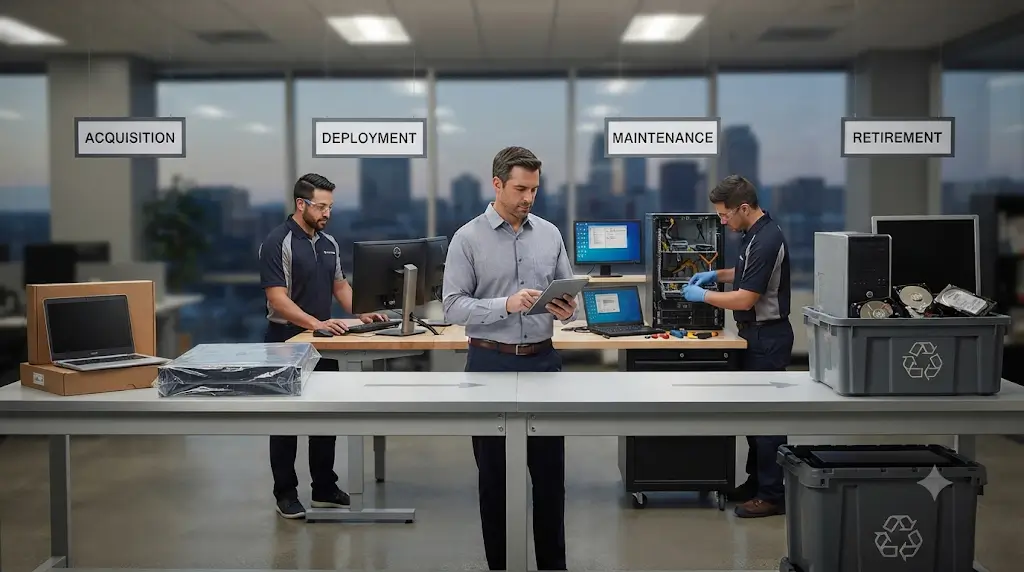
IT asset lifecycle management controls every IT asset from the moment a need is identified through to secure disposal. The five stages are planning, procurement, deployment, operation and maintenance, and retirement and disposal.
Key Takeaways
Five stages give Australian organisations one process for cost, security and compliance.
- Stages: plan, procure, deploy, maintain, dispose.
- Cost: budget whole-of-life cost, not purchase price.
- Tax vs use: ATO laptop life is 2 years; usable life is often longer.
- Security: replace operating systems once vendor support ends.
- Disposal: sanitise data first, as APP 11.2 requires.
What Is IT Asset Lifecycle Management?
It is a structured IT asset management process for tracking hardware and software through planning, purchase, use and retirement. It links cost, security and compliance decisions to each asset’s stage, rather than managing them separately.
Why Does Managing the IT Asset Lifecycle Matter?
It matters because unmanaged assets create cost, security and compliance risk. Victoria’s IT asset management guidance warns that not assessing ageing assets leads to poor planning for timely disposal and replacement.
| Without Lifecycle Management | With Lifecycle Management |
|---|---|
| Unknown assets and duplicate purchases | Accurate register drives buying decisions |
| Unsupported devices left in service | Replacement planned before support ends |
| Data left on retired drives | Certified sanitisation at disposal |
| Working assets scrapped | Reuse and resale recover value |
What Are the 5 Stages of IT Asset Lifecycle Management?
The five IT asset lifecycle stages are planning, procurement, deployment, operation and maintenance, and retirement and disposal. Each stage has its own goal, activities and Australian reference point, summarised below.
| Stage | Goal | Key Activities | Australian Reference |
|---|---|---|---|
| 1. Planning | Buy only what is needed | Needs assessment, budget, whole-of-life cost | Commonwealth Procurement Rules |
| 2. Procurement | Get value for money | Supplier selection, warranty, sustainability | Commonwealth Procurement Rules |
| 3. Deployment | Make every asset visible | Tagging, configuration, register entry | Essential Eight asset discovery |
| 4. Operation and Maintenance | Keep assets secure and productive | Patching, repairs, support tracking | Essential Eight, ATO effective life |
| 5. Retirement and Disposal | Exit securely and responsibly | Sanitisation, reuse, recycling | APP 11.2, ISM, WA e-waste ban |
Stage 1: Planning
Planning defines what IT assets the organisation needs, when and why. It aligns technology purchases with business goals, budgets and replacement schedules, so later stages run to a plan rather than reacting to failures.
What Should IT Asset Planning Include?
IT asset planning should include a current inventory review, user and capacity requirements, a budget, replacement priorities and a disposal plan. Queensland’s education department asks asset owners to document replacement activities and set upgrade priorities at this stage.
- Review the existing asset register and utilisation
- Define requirements by role, location and workload
- Set replacement and upgrade priorities
- Estimate whole-of-life cost, not just purchase price
- Plan for end-of-life sanitisation and disposal from the start
How Do You Calculate Whole-of-Life Cost?
Whole-of-life cost adds every cost an asset creates across its life, not just its purchase price. The Commonwealth Procurement Rules list purchase price, maintenance and operating costs, transition-out costs and licensing costs as typical components.
- Initial purchase price
- Maintenance and operating costs
- Licensing costs
- Transition-out and disposal costs
- Less any resale or redeployment value at end of life
Stage 2: Procurement
Procurement is the stage where planned assets are sourced and bought. The goal is value for money, which the Commonwealth Procurement Rules define as weighing all relevant financial and non-financial costs and benefits, not price alone.
What Should You Check Before Buying IT Equipment?
Before buying IT equipment, check that it meets requirements and fits your security standards. Confirm the warranty and vendor support period, and how the supplier handles returns and end-of-life take-back.
- Fit with documented requirements
- Vendor support and security update period
- Warranty terms and repair options
- Energy efficiency and sustainability credentials
- End-of-life take-back or disposal arrangements
Stage 3: Deployment
Deployment moves new assets into service. Each asset is tagged, configured to your security baseline, assigned to a user or location, and recorded in the IT asset register before it goes into use.
Why Is an IT Asset Register Essential?
An IT asset register is essential because you cannot secure, maintain or dispose of assets you cannot see. ASD’s Essential Eight requires an automated method of asset discovery to run at least fortnightly, even at Maturity Level One.
Stage 4: Operation and Maintenance
Operation and maintenance is usually the longest stage. It covers patching, repairs, user support, routine test and tag inspections, licence management and performance monitoring, so assets stay secure and productive for as long as they deliver value.
When Should IT Assets Be Replaced?
Replace IT assets when vendor support ends, repair costs exceed value, or they no longer meet business needs. Queensland’s education department requires medium-impact assets to be enhanced or retired before end of mainstream vendor support.
- Vendor security updates have ended or are about to end
- Repair costs exceed the asset’s remaining value
- Performance no longer meets user or business requirements
- Warranty has expired on business-critical equipment
Does ATO Effective Life Decide When to Replace Hardware?
No. ATO effective life sets the tax depreciation period, not when you should replace hardware. The Commissioner’s effective life for a laptop is 2 years, yet many business laptops remain secure and productive for longer.
How Does the Essential Eight Apply to Hardware Lifecycle Management?
The Essential Eight makes vendor support a hard deadline in hardware lifecycle management. Operating systems no longer supported by vendors must be replaced, so support end dates belong in every replacement plan.
Stage 5: Retirement and Disposal
Retirement and disposal remove an asset from service securely and responsibly. Data is sanitised first, then each asset is redeployed, resold to recover resale value, or sent for certified recycling.
How Do You Securely Dispose of IT Assets?
Secure IT asset disposal follows a fixed sequence: record the asset, sanitise its data, verify and certify the sanitisation, then reuse, resell or recycle it. The steps below apply to every device that stores data.
- Update the asset register to “retired” status
- Sanitise or destroy storage media using certified data deletion
- Obtain a certificate for each serial number
- Redeploy or resell working equipment
- Send the remainder to certified e-waste recycling aligned with AS 5377:2022
What Are the Legal Requirements for IT Asset Disposal in Australia?
Secure IT asset disposal in Australia is shaped by privacy, security and waste rules. Organisations must destroy or de-identify personal information they no longer need, and Western Australia bans regulated e-waste from landfill.
- APP 11.2: destroy or de-identify personal information no longer needed.
- Privacy penalties: serious interferences with privacy carry maximum penalties of at least AUD $50 million for companies.
- ASD ISM: organisations should develop, implement and maintain IT equipment sanitisation processes and procedures.
- WA e-waste ban: regulated e-waste cannot go to landfill in Western Australia from 1 July 2024.
- E-waste scale: Australia generated 511,000 tonnes of e-waste in 2019.
How Do Australian Governments Define the IT Asset Lifecycle?
Australian governments use the same lifecycle logic under different stage names. Queensland’s education department uses five stages, and Victoria’s asset management framework uses four. Both end in planned retirement or disposal.
| Framework | Stages |
|---|---|
| Industry Model (This Guide) | Planning → Procurement → Deployment → Operation and Maintenance → Retirement and Disposal |
| Queensland Department of Education | Plan → Purchase → Implement → Utilise → Enhance or Retire |
| Victoria – Asset Management Accountability Framework | Planning → Acquisition → Operation → Disposal |
What Are Common IT Asset Lifecycle Mistakes?
The most common mistakes are treating disposal as an afterthought, confusing tax life with useful life, and running assets past vendor support. Each mistake is avoidable with a documented process.
| Mistake | Better Practice |
|---|---|
| No disposal plan until assets pile up | Plan disposal at the procurement stage |
| Replacing hardware on tax schedule alone | Replace on support, cost and performance triggers |
| Running unsupported operating systems | Track vendor support end dates in the register |
| Relying on factory resets for data | Use certified sanitisation with per-device certificates |
| Scrapping working equipment | Assess for redeployment or resale first |
IT Asset Lifecycle Support in Perth and Darwin
Cyber Recycling supports Perth and Darwin organisations across the full asset lifecycle, from deployment to secure retirement. Its IT asset lifecycle management service covers decommissioning, data destruction, value recovery and certified recycling.
Frequently Asked Questions
These answers cover the questions Australian organisations most often ask about managing the asset lifecycle, its stages, replacement timing and secure disposal.
What are the 5 stages of IT asset lifecycle management?
The five stages are planning, procurement, deployment, operation and maintenance, and retirement and disposal. Some frameworks combine or rename stages, but every model starts with planning and ends with secure retirement.
What is the difference between IT asset management and IT asset lifecycle management?
IT asset management is the overall discipline of tracking and governing IT assets. IT asset lifecycle management is the stage-by-stage process within it, following each asset from planning through to disposal.
How long is the lifecycle of a business laptop in Australia?
The ATO’s effective life for a laptop is 2 years for tax purposes. Actual service life depends on vendor support, condition and business needs, and is often longer than the tax period.
Which stage of the IT asset lifecycle carries the most risk?
Retirement and disposal often carries the most risk, because retired devices can still hold personal information. Under APP 11.2, organisations must destroy or de-identify personal information once it is no longer needed.
Does the Essential Eight affect the IT asset lifecycle?
Yes. The Essential Eight requires automated asset discovery at least fortnightly and the replacement of operating systems no longer supported by vendors. Both requirements tie security directly to the deployment and maintenance stages.
What happens to IT assets at end of life?
At end of life, data is sanitised and certified, then working assets are redeployed or resold. The rest are recycled. In Western Australia, regulated e-waste cannot be sent to landfill.
References
The official Australian sources referred to in this article are listed below, each site once.
- https://ppr.qed.qld.gov.au/pp/ict-asset-management-procedure
- https://www.vic.gov.au/victorian-government-it-asset-management-guidance
- https://www.finance.gov.au/government/procurement/commonwealth-procurement-rules/value-money
- https://www.ato.gov.au/businesses-and-organisations/income-deductions-and-concessions/income-and-deductions-for-business/deductions/deductions-for-depreciating-assets-and-capital-expenses
- https://www.cyber.gov.au/business-government/asds-cyber-security-frameworks/essential-eight/essential-eight-maturity-model-and-ism-mapping
- https://www.oaic.gov.au/privacy/privacy-resources/privacy-guides/guide-to-information-security
- https://www.dcceew.gov.au/environment/protection/waste/e-waste
- https://www.wa.gov.au/service/building-utilities-and-essential-services/waste-management/e-waste-landfill-ban-wa
- https://store.standards.org.au/product/as-5377-2022
 Copy Link
Other Blog

Data Protection Risks and How to Mitigate…
09-21-2026
How much data does your business have sitting on its systems right now? Think about customer details. Employee…

Secure Data Destruction: A Complete Guide for…
09-21-2026
Every business laptop, server, USB drive and phone that has ever held customer records or financial data becomes…
What Records Should Businesses Keep When Disposing…
08-20-2026
Australian businesses disposing of IT equipment must retain financial tax invoices, asset depreciation schedules, serialised Certificates of Data…